

In Angular Apps, you are going to come across a scenario where component needs to communicate with each other.
In this blog, we will see how to send data from one component to another component in Angular application.
You can send data from parent to child or child to parent component.
How to pass data from one component to another component in Angular?
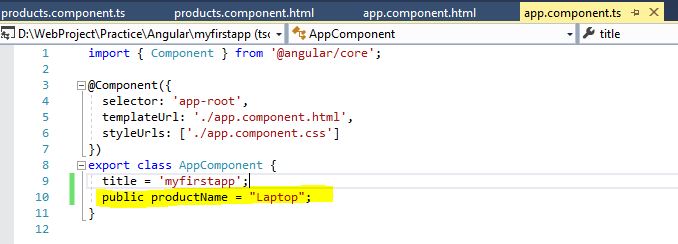
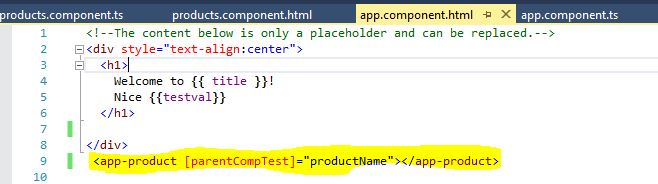
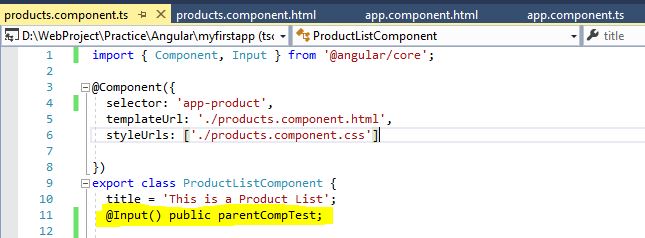
If parent component wants to send data to child component then we have to use @Input decorator
in case child component wants to send data to parent component then we use @Output decorator.
Below diagram explains about communication between component.

Read:- Angular Interview Questions
How to send data from Parent to Child Component?

How to send data from Child Component to Parent Component?
import { Component, Input, Output, EventEmitter } from '@angular/core';
@Component({
  selector: 'app-product',
  templateUrl: './products.component.html',
  styleUrls: ['./products.component.css']
})

export class ProductListComponent {
  title = 'This is a Product List';
  @Input() public parentCompTest;
  @Output() public childEvnt = new EventEmitter();
  Test() {
    this.childEvnt.emit('Welcome to Parent Component');
  }
}<button (click)="Test()">Click Here</button>
<app-product (childEvnt)="componentTest=$event"></app-product>
<h1>{{componentTest}}</h1><app-product (childEvnt)="getData($event)"></app-product>
getData(e)
{
console.log(e);
}public componentTest = '';


MVC Tutorial
Web API Tutorial
Angular Tutorial
Learn TypeScript
Interview Questions and Answers Series –
MVC Interview Questions and Answers
Web API interview questions and answers
Prev – Angular CLI Commands
Next – Angular Directives










Leave a Reply